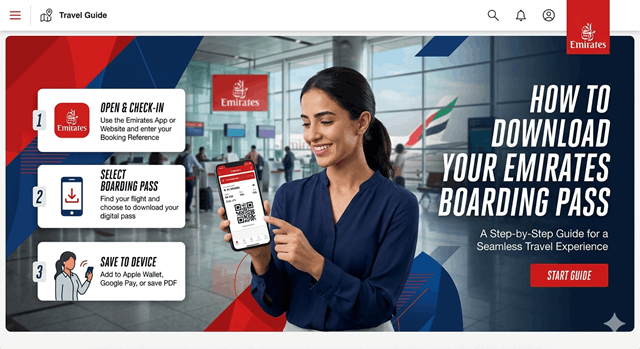
When you travel by air, you must have straightforward planning and convenience. Before reaching the airport, keep your boarding pass ready. It will save your time and maintain comfort. If you’re flying with Emirates, you can download a pass easily in multiple ways. This airline makes downloading a boarding pass easier for everyone, ensuring a smooth travel experience. In the following blog, we’ll give you an accurate idea of downloading Emirates.
Does travelling with Emirates Airlines offer comfort & safety?
When you choose Emirates Airlines for travel, you will get comfort & premium service. The quality of services they offer makes them the top-most choice globally. This airline is popular for its advanced fleet & vast network. Emirates connects across 6 continents while managing the highest security and service quality.
From easy online booking to smooth check-in options, the airline focuses on reducing stress and enhancing convenience. Passengers enjoy impressive amenities, well-designed seating space, and trained crew members for seamless service.
Emirates airline stands out for offering comfort & exceptional onboard experience. The airlines offer an in-flight entertainment system along with complementary meals and quality beverages to elevate the travel experience. Travelling with Emirates Airlines isn’t about reaching the destination but about enjoying a smooth & memorable journey from take off to landing.
Whether you’re flying frequently or using this airline every other day, having the boarding pass ready before you reach the airport can save time and security. Now, let’s scroll down the steps to follow for the Emirates boarding pass.
How to download an Emirates boarding pass through web check-in?
The easiest method of getting your onboarding pass is through the Emirates web check-in service. Here is how you can do it-
- Go to the official Emirates website.
- Click on “Manage booking” or “check-in” options available on the homepage.
- Enter the details, booking reference/ticket number.
- Offer last name as per booking details.
- Once you fill in the necessary details, choose the flight for which you want to check in.
- Selection of the preferred seat if the option is available.
- Once you confirm check-in, you’ll get an option to download the boarding pass.
- Click the download button to save the boarding pass in PDF format.
Steps to download the Emirates boarding pass through the mobile app check-in
This is another convenient option; you can choose to check in via the Emirates official mobile app.
- The Emirates app is available on both Android & iOS platforms. Download it through the Google Play Store & Apple App Store.
- Log in to the mobile app through your official mail id & booking details.
- Fill up the flight details & select the seat if applicable, then confirm check-in.
- The boarding pass will be available as a QR code or a PDF.
- You can either save it on your phone or email it to yourself to get access later.
Steps to download the Emirates boarding pass through the airport kiosks
In case you are unable to check in online, you can use self-service kiosks at the airport to print out the boarding pass.
- Find the Emirates Kiosk at the airport.
- Put all the details asked on the screen, including the PNR number, or scan your passport.
- Follow the instructions to print the boarding pass.
- Once you check in online through the app, Emirates also sends the boarding pass directly to the registered email.
- You can take a printout to show it at the airport security checkpoint.
When can I download the Emirates boarding pass?
The Emirates boarding pass is the official travel document that enables you to board your flight. This pass contains details about the name of the travelling individual, flight number, seat number, boarding gate/time, barcode, etc.
You can get your pass virtually, depending on preference & travel needs. It allows passengers to check in online & download the boarding pass 48 hours to 90 minutes prior to departure. It’s better if you complete the check-in session quickly to opt for a seat of your choice.
Check out the papers required for downloading a boarding pass
Keep the documents ready for a smooth online check-in process. A valid passport is crucial for international flights & make sure the passenger’s name matches the booking details. You will also require the booking reference number or ticket number to access the reservation.
Based on the destination, a valid visa is required for verification before the boarding pass is issued. Emirates Airlines might require extra paperwork for security & immigration checks prior to boarding.
Perks of online downloading of an Emirates boarding pass
Downloading the Emirates boarding pass online comes with several benefits. It makes your travel experience faster, smoother, & organized.
- When your boarding pass is already downloaded at your own comfort, you can skip the long queues. You can go straight to the baggage drop or security during peak travel hours.
- The virtual boarding pass limits the last-minute stress. Completing these check-in steps from your own comfort offers peace of mind.
- Downloading the online boarding pass through the Emirates app is easy to access. It gives you a seamless journey instead of getting worried about losing a physical pass.
- The digital boarding pass enables quick scanning at the security checkpoint, supporting your journey efficiently.
- Utilizing the digital boarding pass promotes paper-free travel, making it an eco-friendly choice for travelers.
- The online check-in enables you to confirm or change seats in advance, verify comfort and seating preferences.
- You can save or take a screenshot, or print the boarding pass anytime.
Downloading the Emirates boarding pass digitally makes travel convenient, time-efficient, and peaceful. Overall, it will help you to save your journey with a positive mind.
Necessary tips to follow while downloading the Emirates boarding pass
Downloading the Emirates onboarding pass makes the airport experience smoother. To avoid last-minute hassle, it’s necessary to follow the few practical tips & prepare ahead. The online check-in mostly opens 48 hours prior to departure.
Completing the process early allows enough time to resolve the document or seat-related confusion. Ensure the travel details are accurate & keep a backup of your boarding pass for convenience. Here follow the tips-
- You must double-check that your information matches your passport.
- Keep the passport, visa & travel documents ready for check-in.
- For accessing the pass later offline, take a picture or download it.
- Keeping an extra copy is good to access it later when you travel.
- Make sure the battery level of your phone is full, so that you can access the boarding pass anytime.
- Even if you downloaded the boarding pass online, visit the airport before time for security formalities.
By following these hacks, travelers can stay stress-free & opt for a smooth experience.
Final Thoughts
Downloading the Emirates boarding pass digitally is the easy & effective way to make the travel experience stress-free & convenient. By fulfilling the check-in advance, travelers can save time at the airport. It will keep you away from the long queues & travel details organized.
Having a digitally printed boarding pass verifies faster movement through security & boarding gates while minimizing the last-minute tasks. Keep all the documents ready, and review the details you have submitted manually. Overall, online Emirates boarding pass download delivers an effective & travel-friendly start to your journey. Follow the above hacks to make your journey with Emirates Airlines enjoyable and peaceful. Happy vacation!