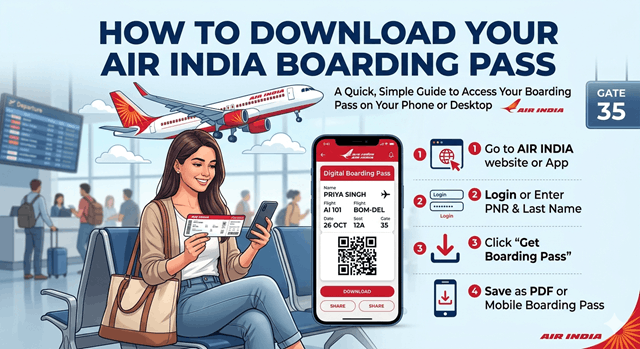
Are you ready to explore the delightful experience of travelling with Air India soon? Having a digital boarding pass can make your travel more enjoyable. No matter if you are travelling for a business meeting, vacation, or an emergency trip, having your boarding pass downloaded earlier can save you time. Further, it can reduce stress while helping you prevent long queues at the airport.
If you are somehow facing issues or having difficulty downloading your boarding pass, then this guide can be your saviour. You can go through the steps here that can make your Air India boarding pass downloading more convenient.
Why is it necessary to Download Your Boarding Pass Earlier?
It is necessary for us to understand the essentiality of your boarding pass instead of jumping into the steps directly. It is an important document that grants you access to board your flight. It includes necessary data like your flight number, seat assignment, and departure gate.
- Downloading it before can save you time at the airport.
- It lets you choose or confirm your seat as per your preference.
- You can reduce last-minute stress while making the security check smoother and error-free.
Air India accesses web check-in typically 48 hours to 1 hour before domestic flights and up to 24 hours before international flights.
Essential Details You Need to Download Your Boarding Pass
Before you download your boarding pass, here are some details that you need to remain updated about.
- Booking Reference PNR number.
- Valid ID proof for airport verification.
- Your last name, as mentioned in the ticket.
- Smartphone or laptop with a proper internet connection.
Methods to Download an Air India Boarding Pass
Here are the most convenient ways people use to download their Air India boarding pass on time without any mistakes.
Air India Web Check-in
This is one of the most commonly used ways to download the boarding pass.
- You need to visit the Air India website and navigate to the web check-in section.
- Enter all your booking references and last name to retrieve your booking.
- Pick the passengers that you desire to check in.
- From the available options, choose your preferred seats.
- Confirm your check-in and download your boarding pass.
- Web check-ins allow you to save time at the airport while keeping you away from long waiting hours.
Air India Mobile App
This is another reliable method to download your boarding pass on time without any risks.
- You can easily download the Air India application from the App Store or Google Play Store.
- Now, open the app, fill in the details, and make sure to be precise with your credentials.
- Enter all your booking details in the check-in section.
- Prefer your seats and book them in advance.
- Complete the process and download the boarding pass.
This seamless approach helps you get your boarding pass right on your mobile phone. Further, this can keep your travel documents handy.
Kiosks
Many people desire to check in right at the airport. You can also avail this process through the available kiosks present in the airports.
- Find the kiosks present in the airport.
- Provide all your necessary booking details to access your booking.
- After choosing your seats, print your boarding pass.
- If you are willing to get the physical copy of your boarding pass, kiosks can be a convenient approach.
Is it Possible to use a Mobile Boarding Pass?
Mobile boarding passes are allowed at most airports. You need to present the QR code at the security checks. However, you still need to have a physical printout of the document verification. So, go through the rules of the airports before the departure date.
When Should You Download Your Air India Boarding Pass?
Here, you can go through the general check-in window to understand when you should download your Air India boarding pass.
Domestic Flights
- It opens 48 hours before the departure.
- Closes around 60 minutes before the departure.
International Flights
- It opens around 24 hours before the departure.
- Closes 90 minutes before the departure.
It is always better to complete the web check-in as soon as possible.
Tips to Keep Your Check-in Experience Convenient
To make sure your check-in experience remains hassle-free and efficient, you need to stick to the steps given below.
Keep Your Details Authentic
- Before you download your boarding pass, make sure all the details you have provided are correct.
- This step ensures there will be no mistakes in the booking while keeping you away from cancellation risks.
Arrive at the Airport Early
- You need to arrive at the airport before the time, even if you have a digital boarding pass.
- This can help you go through the security process in detail and find your departure gate without any rush or confusion.
Prefer Accessibility
- Save your boarding pass in your phone or print this to access it quickly when required.
- This can allow you to quickly present it to your authorities when they need it.
Common Problems You Might Face While Downloading Your Boarding Pass
Many passengers might face issues while initiating their online check-in. Here you can go through the solutions to such errors.
Invalid PNR
This issue might happen due to a typing mistake or a wrong last name format. So, you must double-check your PNR while providing your personal details. Use the exact last name as given on your ticket and wait for some hours if your booking is new.
Unable to Check in Online
This problem might hamper you if you booked your tickets via travel agents or if you have any special assistance requests. Many people deal with such issues when they travel with infants or have any visa document verification requirements. So, in such a scenario, you need to visit the airport counter early to initiate manual check-in.
Your Boarding Pass is not downloading
If you are facing the problem of your boarding pass not downloading, try a different browser or clear the cache and cookies. You can also use a mobile application instead, or check your email for the boarding pass attachment.
Name Mismatch
If your name on the tickets doesn’t match your ID, make sure to contact Air India customer support as soon as possible, and do not wait until you get to the airport.
What Will Happen if You Lose Your Boarding Pass?
If you mistakenly lost your boarding pass, don’t panic at all. You can easily re-download it from the site or the application. Print it again at the airport kiosk. You can also request a reprint at the check-in counter.
Advantages of Online Check-in
Your travel history will be much more efficient if you consider online check-in. Some of the valuable aspects are given below.
- This process can help you avoid long waiting hours, and you can easily choose the seats that you like.
- It reduces unnecessary contact at the crowded counters.
- As everything can be handled digitally, you have to go through minimal paperwork, while making the whole process quicker.
- You can also gain better control over your journey by confirming the details beforehand.
Conclusion
Downloading your boarding pass is extremely simple, and it can save you a lot of time while enhancing your experience. Starting from the Air India website to its application and kiosks, everything remains reliable to make your journey more seamless. However, you need to initiate the web check-in early and verify all the details to be authentic. This can keep your boarding pass easily accessible on your phone or as a printout.