Indigo is the largest airline, popular for its large domestic network, on-time service & hassle-free travel experience. The largest convenience Indigo offers is the potential to download the boarding pass online, save time at the airport, & support you to avoid long queues. If you are still rushing to the airport early, then it’s time to upgrade!
Introduce yourself with the online boarding pass download. With the advancement in technology, Indigo has now effectively transformed many customers to stand in line manually for a pass. The online download facilities enable travelers to streamline their flying experience.
Whether you are a first-time traveler or frequently traveling, this detailed guide will walk you through how to download the Indigo boarding pass, using web check-in, mobile app, and alternative methods.
What information does an indigo boarding pass hold, and where can you download them?
The boarding pass is a kind of official document that enables passengers to board an aircraft. This pass holds necessary travel information that covers passenger name, flight & seat number, boarding gate, time, and QR code for security & boarding check. Thanks to IndiGo, which gives access to digitally print the boarding pass at their own convenience.
Once you complete the web Check-in, you can download their boarding pass. The boarding pass is available 48 hours before departure, and in case of a domestic flight, it is available up to 60 minutes before departure. For international flights, the web check-in timeline might vary according to destination & regulatory demands.
Step-by-step guide to download the Indigo boarding pass
When you fly with Indigo, online downloading of a boarding pass is seamless and convenient. Here is how you can do it-
-
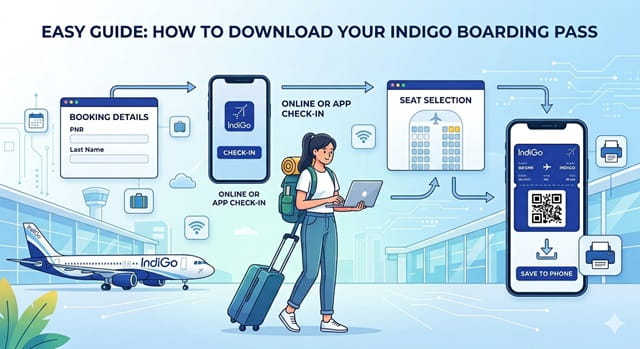
Complete web check-in
Before you download the boarding pass, first fulfill the web check-in process. Web check-in is available from 1 hour to 48 hours before the scheduled departure of the flight. Follow the steps below-
- Reach out to the official Indigo website or use the mobile app.
- Hit the check-in button on the homepage & submit your PNR or booking reference along with your name.
- Choose the passenger & seat based on your preference and confirm the check-in details.
2. Download the Boarding Pass
Once you complete the check-in phase, you can swiftly download the boarding pass. Follow the steps-
- Once the check-in process is confirmed, you will get the option to download your boarding pass on the screen.
- Hit the download button. And save it either directly to your phone or use the wallet feature on the indigo app for offline access.
- If you’ve opted to receive it via mail, check your inbox and download the PDF.
3. Print the Boarding Pass
- For a smooth airport experience, you can either print the boarding pass or save it on your smartphone for easy scanning.
- Make sure the QR code on the boarding pass is visible clearly for scanning throughout the security check.
Terms & Conditions for online Indigo web check-in
There are multiple perks of doing an Indigo flight check online, but to avail them, follow all the guidelines.
- IndiGo flight check-in can be completed online through the official site only. You can also complete this at the airport using self-service Kiosks.
- The passenger must have all the necessary documents for travel. They must be present at the airport check-in counter at least 60 minutes before departure time.
- Passengers are asked to show their boarding pass with valid ID proof during security checkpoints.
- The airline owns the right to deny boarding to any passenger who doesn’t comply with the airline’s terms & conditions.
5 important tips to know for safe downloading of a boarding pass
- Always download the Indigo boarding pass from the official site or mobile app. This is how you can avoid the fishy links, data theft issues, and incorrect details.
- The web check-in must be completed within the allowed time. As it can’t be downloaded prior to check-in or after the check-in deadline closes.
- Save the boarding pass offline also as a PDF format, or take a screenshot so that you can seamlessly access it if mobile data is lost.
- It is suggested to double-check the passenger name, flight number, date, and seat information on the boarding pass to avoid last-minute complications.
- Keep the phone charged because the airport security & boarding team repeatedly scan your boarding pass.
Why is downloading an online Indigo boarding pass beneficial?
- Downloading the IndiGo boarding pass online helps you to ditch the long check-in lines at the airport. With web check-in, you can complete the whole process in advance. You can directly proceed with security screening that saves your time. Additionally, it makes your experience stress-free and enjoyable, especially during peak times.
- Online boarding pass download enables completing the check-in from anywhere. Yes, you can download it from the comfort of your own space. This convenience is mostly appreciated by the passengers dealing with tight schedules.
- When you have your boarding pass saved on the phone gallery, you can access it anywhere. You don’t need to fear losing printed tickets. It also helps you to quickly scan at the security & boarding gate.
- When downloading the boarding pass online, you have access to finalize your preferred seat in advance. It enhances comfort, especially when you have some special requirements.
- Utilizing an online board can minimize paper usage & eliminate the printing costs. It promotes eco-friendly travel and helps passengers avoid last-minute complications.
Common problems you might face while downloading the Indigo boarding pass
Unable to retrieve details of booking
Passengers sometimes find complications during web check-in by entering the PNR number or misspelling their last name. It avoids access to the boarding pass. You must check the booking details from your confirmation mail & ensure the name matches exactly with the ticket booking.
In a few cases, web check-in might be disabled because of international travel rules, group booking & special fare. If this is your case, then reach out to the airport early for complete check-in at the Indigo counter or self-service.
Unable to download the boarding pass
This might happen if there is a technical glitch, a slow internet connection, or a browser error. It is good to try once again from a different browser. Clear your cache and then refresh the browser to open the official site. Make sure the internet connection is strong. If everything is fine, visit the airport.
Error in seat selection
Selection of a seat may fail because of seat unavailability or a payment error for a paid seat. In scenarios like this, proceed without seat selection. You can select any other seats to successfully complete the check-in process.
Name & ID mismatch
If the passenger’s name on the boarding pass is different from the government-issued ID, airport security might deny boarding. You must connect with the indigo customer support immediately for minor changes.
By following these tricks, you can simplify your downloading process & simplify the travel experience. Save your time from the airport hassle with the right approaches.
Summary
Downloading the IndiGo Boarding pass online makes your travel easier and more organized. By completing web check-in on time & keeping your boarding pass accessible, you can get rid of stress. Understanding these common steps ensures a smooth check-in experience. Follow all these tips and travel with confidence.